
Losing your caste certificate can feel stressful
But don’t worry, let me tell you how to get a duplicate caste certificate is easy and safe if you follow the right steps.
This guide will help you understand everything in simple language.
What is a Duplicate Caste Certificate?
A duplicate caste certificate is a new copy issued when your original certificate is:
- Lost
- Damaged
- Torn
- Not readable
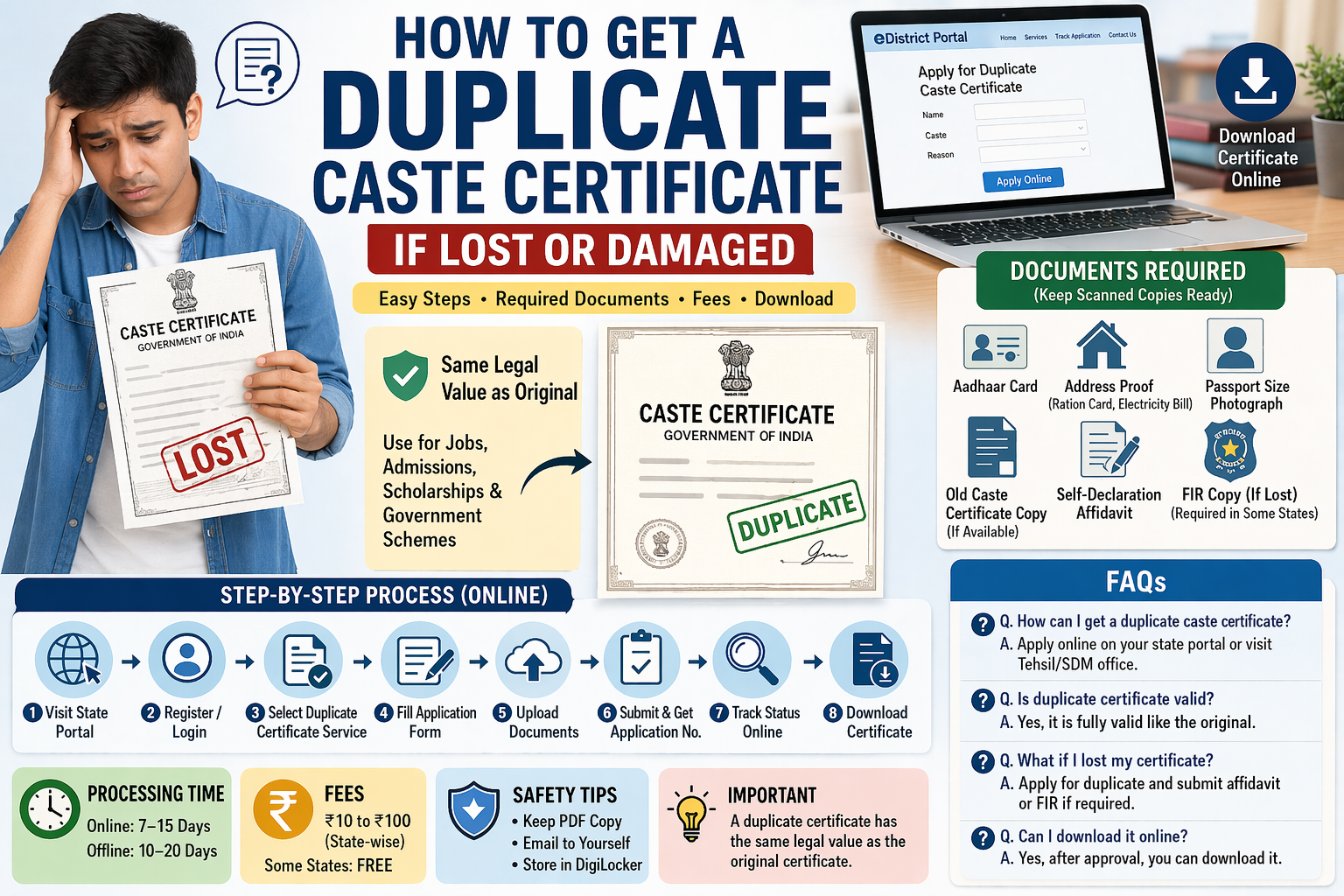
It has the same legal value as your original certificate.
When Do You Need a Duplicate Certificate?
You should apply if:
✔ Your certificate is lost
✔ It is damaged or faded
✔ You need a fresh copy for official use
Important: You do not need to apply again from zero — just request a duplicate.
Step-by-Step: How to Get a Duplicate Caste Certificate
Method 1: Online (Best & Fastest)
Most states in India provide online services.
Steps:
- Visit your state government portal
(Example: eDistrict, Aaple Sarkar, MeeSeva, etc.) - Login or register
- Use mobile number / Aadhaar
- Search for:
“Duplicate Caste Certificate.”
OR
“Re-issue Certificate.” - Fill the form:
- Name
- Old certificate number (if available)
- Reason (lost/damaged)
- Upload documents
- Submit application
- Save the application number
- Track status online
- Download duplicate certificate
Method 2: Offline (If Online Not Available)
If your state does not support online:
Steps:
- Visit:
- Tehsil office
- SDM office
- Ask for a duplicate caste certificate form
- Fill the form
- Attach documents
- Submit to the officer
- Collect receipt
- Wait for approval
Documents Required for Duplicate Caste Certificate
Basic Documents
- Aadhaar Card
- Address proof
- Passport-size photo
Important Documents
- Old caste certificate copy (if available)
- Application number (if known)
Extra (If Lost)
- Self-declaration affidavit
- FIR copy (in some states)
Tip: FIR is usually required only if the certificate is completely lost.
Do You Need FIR for Lost Caste Certificate?
Not always.
- Some states → Not required
- Some states → Required
✔ Safe option:
File a simple FIR or lost document report at the police station.
Processing Time
- Online: 7–15 days
- Offline: 10–20 days
Fees
- ₹10 to ₹100 (depends on state)
- Some states offer FREE service
How to Download Duplicate Certificate?
After approval:
- Log in to the portal
- Click “Track Application”
- Enter application number
- Click download
Save PDF safely in your phone and email.
Common Mistakes to Avoid
❌ Giving wrong details
❌ Not uploading clear documents
❌ Applying multiple times
❌ Forgetting the application number
Safety Tips (Very Important)
✔ Keep digital copy (PDF)
✔ Email it to yourself
✔ Store in DigiLocker (if available)
This helps avoid future problems.
People Also Ask (FAQ)
1. How can I get a duplicate caste certificate?
Apply online through the state portal or visit the Tehsil office.
2. What if I lost my caste certificate?
Apply for a duplicate and give a self-declaration or FIR if needed.
3. Is a duplicate caste certificate valid?
Yes, it is fully valid like the original.
4. Can I download caste certificate online?
Yes, after approval from the government portal.
Expert Advice
As someone guiding students and applicants:
👉 Always keep your documents safe and scanned.
👉 Apply through official government websites only.
👉 Avoid agents — you can do it yourself easily.
Final Words
Losing your caste certificate is not a big problem
Just follow the steps in this guide, and you will get your duplicate certificate without stress.
Helpful for You.
🎓 Are you applying for scholarships or government benefits?
Don’t miss your chance!
Get my easy scholarship guide and learn how to get ₹10,000–₹5 lakh benefits step-by-step.
Related Posts: